


- Free shipping over 99 € Delivery in 2–7 working days
- You can return the goods within 100 days Risk-free shopping, we stand behind our products
- Authorised dealer 100% genuine goods straight from the manufacturer
Voice Caddie SC4 Pro Launch Monitor & Golf Simulator
GAGPSSCSC4P
EAN: 856640005727
This product is currently unavailable.
Have a question about this product or looking for an alternative? Write to us.

Voice Caddie SC4 Pro Launch Monitor & Golf Simulator

Description
Voice Caddie SC4 Pro Launch Monitor & Golf Simulator
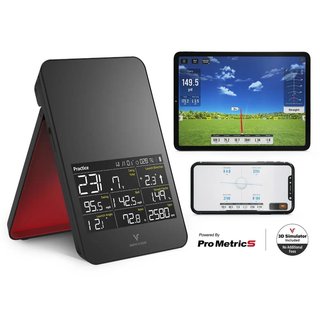
The Voice Caddie SC4 PRO is a professional-grade Doppler radar launch monitor and 3D driving range simulator engineered for seamless indoor and outdoor use. Powered by Voice Caddie's proprietary ProMetrics engine, it captures precise ball and club head data across the full shot cycle — from swing to impact to ball flight — delivering real-time, in-depth performance analysis that golfers of every level can act on immediately. The SC4 PRO goes beyond the standard data set by adding advanced ProMetrics metrics: side spin, spin rate, backspin, and shot dispersion, giving you deeper insight into exactly why your ball behaves the way it does. Three versatile practice modes — Practice Mode, Target Mode, and the SC4 PRO-exclusive Swing Speed Mode — combined with full compatibility with the all-new VOICECADDIE S app and E6 Connect golf simulation, make the SC4 PRO one of the most complete and accessible launch monitors available at its price point.
Key Features
- ProMetrics Doppler Radar Engine: Measures 13 ball and club parameters in real time with professional-grade accuracy indoors and outdoors.
- 8 Core Data Points (standalone screen): Carry and total distance, ball speed, swing speed, smash factor, apex, launch angle, launch direction, and spin rate — all displayed on the device's built-in screen without a smartphone.
- Advanced ProMetrics Metrics (via app): Side spin, backspin, spin axis, and dispersion — exclusive additional data available through the VOICECADDIE S app.
- Three Practice Modes: Practice Mode for real-time performance feedback, Target Mode for distance-challenge and precision accuracy training, and Swing Speed Mode (exclusive to SC4 PRO) for focused speed development.
- VOICECADDIE S App Integration: Connects via Bluetooth to the free VOICECADDIE S app (currently iOS only; Android coming soon) for a real-time 3D driving range, advanced statistical analysis, and customizable training modes.
- E6 Connect Golf Simulator: Compatible with E6 Connect and Optishot Orion — free subscription includes one photorealistic course plus a driving range; additional courses require an optional paid subscription.
- Voice Distance Output: Announces carry distance instantly after every shot so you never have to look away from the screen.
- Per-Club Statistics: Tracks and stores performance data for every club in your bag for ongoing trend analysis.
- Barometric Pressure Sensor: Adjusts calculations for ambient atmospheric conditions to improve real-world distance accuracy.
- Built-In Screen & Magnetic Remote: High-visibility display shows shot data instantly; the included magnetic remote lets you change club settings and targets without walking to the device.
- No Special Balls Required: Works accurately with any standard golf ball — no proprietary balls, no hidden fees, no extra hassle.
- Indoor & Outdoor Use: Compact and lightweight design sets up in minutes; requires only approximately 1.5 m behind the ball and about 3 m to a net or screen for accurate indoor readings.
Technology in Detail
ProMetrics Engine — Professional Accuracy
At the heart of the SC4 PRO is Voice Caddie's proprietary ProMetrics engine — a sophisticated measurement and algorithm system that goes far beyond the data set of previous Swing Caddie models. ProMetrics measures 13 parameters in real time, covering the complete journey from club head through impact to ball flight. It is responsible for unlocking the advanced metrics that set the SC4 PRO apart: spin axis, side spin, backspin, and shot dispersion. By enhancing the accuracy of all readings simultaneously, ProMetrics ensures that both the on-device display data and the deeper app metrics are as reliable as possible, whether you are standing on a driving range or hitting into an indoor net in your garage. The result is a level of analytical depth that was previously only accessible on much more expensive launch monitors.
Swing Speed Mode — Exclusive to SC4 PRO
The brand-new Swing Speed Mode is an exclusive feature found only on the SC4 PRO and represents a significant step forward in targeted speed training. Unlike Practice Mode and Target Mode, Swing Speed Mode allows golfers to measure club head speed in real time even without hitting a ball, making it ideal for speed-training drills, warm-up routines, and SuperSpeed-style overspeed protocols. The real-time feedback loop helps you instantly feel the relationship between technique changes and swing speed output, letting you focus specifically on building power and consistency. Whether you are working on generating more speed with your driver or trying to maintain consistent iron speed through the bag, Swing Speed Mode provides the precise, actionable data you need to make measurable progress.
VOICECADDIE S App — 3D Simulator & Advanced Analytics
The all-new VOICECADDIE S app transforms the SC4 PRO from a data-capturing device into a full 3D golf simulator and advanced analytics platform. Connect via Bluetooth to your iPhone or iPad and enter a real-time virtual driving range where every shot is rendered in stunning 3D ball flight, complete with all measured metrics displayed alongside the visualization. The app unlocks the ProMetrics-powered advanced data — spin axis, side spin, backspin, and dispersion — that does not appear on the device screen itself. Advanced statistical analysis tools let you review performance trends club by club over time, while customizable training features allow you to tailor sessions to your specific goals. The VOICECADDIE S app is currently available for iOS (iPhone, iPad, and Apple Silicon Mac); Android compatibility is coming soon. All core simulator features — including the 3D driving range — are included at no additional cost.
E6 Connect Golf Simulation
The SC4 PRO is fully compatible with E6 Connect and Optishot Orion, the industry-leading golf simulation platform renowned for its photorealistic course graphics and accurate ball flight physics. The free E6 Connect subscription included with the SC4 PRO grants access to one full photorealistic golf course plus a driving range, giving you an immediate home golf simulator experience the moment you set up the device. Additional courses from the extensive E6 Connect library are available through an optional paid subscription. Please note that the golf simulator functionality (E6 Connect and in-app 3D simulation) is currently available for iOS only; Android is not currently supported for simulator use. This pairing of hardware and software creates a complete home simulator setup at a fraction of the cost of traditional golf simulation systems.
Voice Output & Magnetic Remote Control
Designed for maximum convenience during practice, the SC4 PRO features an integrated voice output system that announces your carry distance after every shot — no need to walk over to the device or squint at a screen between shots. The spoken feedback keeps your rhythm intact and lets you focus entirely on the next swing. Complementing the voice output is the built-in magnetic remote control, which snaps securely to the unit when not in use and lets you switch clubs, set distance targets, and scroll through shot history from anywhere within range. Together, these two features eliminate the friction that plagues many budget launch monitors and ensure that the practice experience stays smooth, efficient, and focused from the first shot to the last.
13 Measured Parameters & Per-Club Statistics
The SC4 PRO measures a total of 13 parameters spanning ball flight and club performance: carry distance, total distance, ball speed, swing (club head) speed, smash factor, apex, launch angle, launch direction, spin rate, side spin, backspin, spin axis, and shot dispersion. Eight of these parameters are shown directly on the device's high-visibility built-in screen in standalone mode; the full 13-parameter data set is accessible via the VOICECADDIE S app. The device also maintains per-club statistics, tracking each club's historical averages so you can objectively compare performance across sessions and identify which clubs are consistent and which need work. A barometric pressure sensor further refines distance calculations by accounting for atmospheric conditions, delivering more accurate carry and total distance figures in varying weather environments.
Specifications
| Specification | Detail |
|---|---|
| Radar Technology | Doppler Radar |
| Measurement Engine | ProMetrics (Voice Caddie proprietary) |
| Total Parameters Measured | 13 |
| On-Device Display Parameters | Carry distance, total distance, ball speed, swing speed, smash factor, apex, launch angle, launch direction, spin rate (8 core) |
| App-Only Parameters | Side spin, backspin, spin axis, shot dispersion |
| Practice Modes | Practice Mode, Target Mode, Swing Speed Mode |
| Simulator Compatibility | E6 Connect / Optishot Orion (optional subscription for extra courses) |
| App Compatibility | VOICECADDIE S (iOS — iPhone, iPad, Apple Silicon Mac); Android coming soon |
| Connectivity | Bluetooth |
| Display | Built-in high-visibility screen |
| Remote Control | Included magnetic remote |
| Voice Output | Yes — spoken carry distance after each shot |
| Per-Club Statistics | Yes |
| Barometric Pressure Sensor | Yes |
| Battery | Rechargeable Lithium-Ion (approx. 10 hours) |
| Ball Requirement | Standard golf balls — no special balls needed |
| Setup Distance (outdoor) | Approx. 1.5 m behind the ball, in line with target |
| Setup Distance (indoor — ball to screen) | Minimum approx. 3 m between ball and net/screen |
| Use Environment | Indoor & outdoor |
| Included Accessories | Alignment stand (included with all SC4 PRO units), magnetic remote |
Please note: Golf simulator functionality (E6 Connect and VOICECADDIE S 3D simulation) is currently available for iOS only (iPhone, iPad, Apple Silicon Mac). Android support is not yet available for simulator use. The VOICECADDIE S app Android version is in development — check voicecaddie.com for the latest availability updates.
Video

Ask us
We will reply to your question by the next business day at the latest.
Voice Caddie SC4 Pro Launch Monitor & Golf Simulator